How to Check if You Are Behind CGNAT (Carrier-Grade NAT)
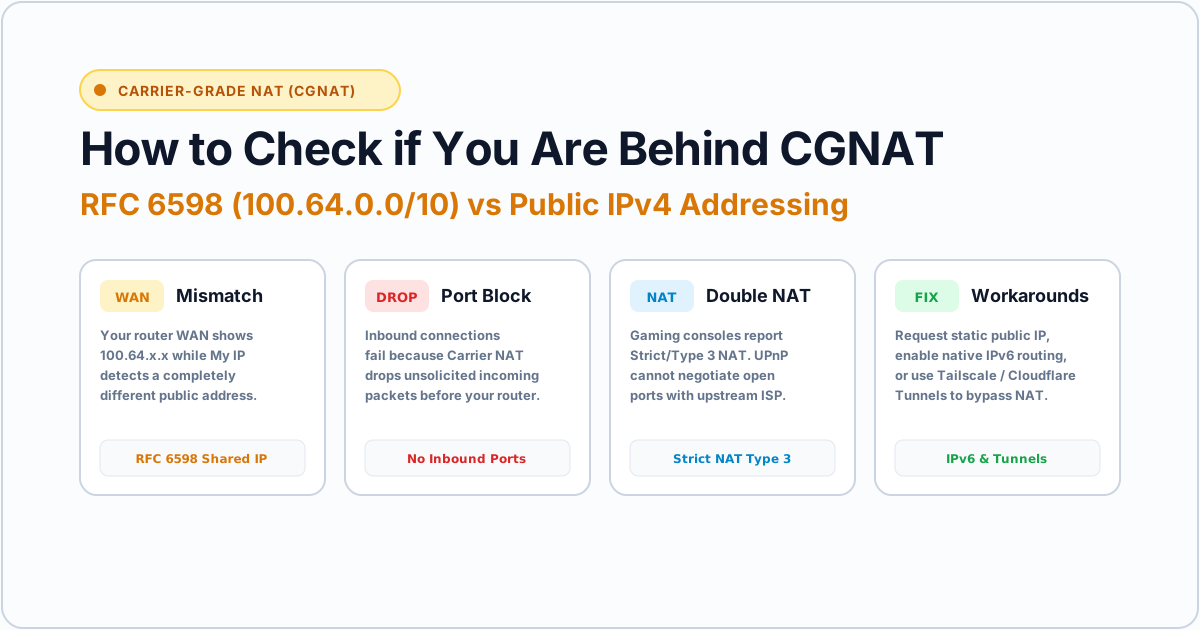
If you have ever tried setting up port forwarding for a gaming server, accessing a home lab over the internet, or fixing a “Strict NAT” issue on your console, only to find that your ports refuse to open no matter what you configure on your router, you are almost certainly behind CGNAT (Carrier-Grade NAT).
In this guide, we will break down what CGNAT is, show you three simple methods to verify if your internet connection is behind it, and explain your options to bypass it.
What Is Carrier-Grade NAT (CGNAT)?
Due to the global exhaustion of IPv4 addresses, Internet Service Providers (ISPs) can no longer assign a unique public IPv4 address to every residential customer.
To work around this, ISPs implement Carrier-Grade NAT (also known as Large-Scale NAT or LSN). Instead of assigning you a direct public IP, your ISP assigns your router a private, shared IP address from a reserved address block. Thousands of customers in your neighborhood share a single cluster of public IP addresses when browsing the web.
[ Your Home Devices ]
         │ (Private LAN IP: 192.168.1.x)
[ Your Home Router ]
         │ (ISP Shared WAN IP: 100.64.x.x)
[ ISP Carrier-Grade NAT Gateway ]
         │ (Single Shared Public IP: 195.x.x.x)
[ The Global Internet ]
While regular web browsing, streaming, and downloads work normally through CGNAT, inbound incoming connections from the outside internet cannot reach your router.
Why CGNAT Causes Problems
Being behind CGNAT creates several practical headaches for power users and gamers:
- Port Forwarding Fails Completely: Because you do not hold the external public IP on your router, forwarding a port in your router settings has zero effect on the upstream ISP gateway.
- Strict NAT / Moderate NAT in Games: Peer-to-peer multiplayer games (Call of Duty, FIFA, GTA Online, Nintendo Switch) fail to connect directly with other players, causing matchmaking failures or voice chat drops.
- Remote Access & Hosting Blocked: You cannot self-host a Plex media server, Minecraft server, Home Assistant instance, or personal VPN server using standard dynamic DNS (DDNS).
- IP Blacklisting & Captchas: Because hundreds of other users share your exit public IP, if one user gets banned or runs abusive bots, you may encounter frequent Cloudflare Captchas or temporary IP bans on forums and gaming networks.
Method 1: Compare Your Router WAN IP With Your Public IP (Fastest Test)
The most reliable way to identify CGNAT is to check whether your router’s WAN (Wide Area Network) IP matches the public IP address the internet sees.
Step 1: Find Your True Public IP
Open our homepage at My IP or run the IP Lookup tool. Note the public IP address displayed (for example: 195.181.171.234).
Step 2: Check Your Router’s WAN Status Page
- Open your browser and navigate to your router’s local gateway address (usually
192.168.1.1or192.168.0.1). - Log in with your admin credentials.
- Locate the Status, WAN, or Internet dashboard.
- Look for the IPv4 WAN IP Address assigned to the router’s internet interface.
Step 3: Compare the Two Addresses
- If the WAN IP matches your Public IP exactly: You have a real public IP address. You are NOT behind CGNAT. Port forwarding will work.
- If the WAN IP is different from your Public IP: You are behind CGNAT (or a double-NAT setup with an ISP modem combo).
Method 2: Check for the RFC 6598 Reserved Address Range
The Internet Engineering Task Force (IETF) created a dedicated, reserved IPv4 subnet specifically for Carrier-Grade NAT under RFC 6598:
100.64.0.0/10(Any IP from100.64.0.0to100.127.255.255)
If your router’s WAN IP address starts with 100. and falls between 100.64.x.x and 100.127.x.x, you are 100% confirmed to be behind CGNAT.
Common Private & CGNAT Subnets at a Glance:
| Address Range | Classification | Usage |
|---|---|---|
100.64.0.0 – 100.127.255.255 |
RFC 6598 (CGNAT) | ISP Carrier-Grade NAT |
192.168.0.0 – 192.168.255.255 |
RFC 1918 (Private Class C) | Local home router LAN |
10.0.0.0 – 10.255.255.255 |
RFC 1918 (Private Class A) | Corporate LAN or ISP NAT |
172.16.0.0 – 172.31.255.255 |
RFC 1918 (Private Class B) | Local networks & virtualization |
| All other valid ranges | Public Routable IPv4 | Direct internet addressing |
Note: Some non-compliant ISPs mistakenly use standard RFC 1918 addresses (like 10.x.x.x or 172.16.x.x) on their WAN leases instead of 100.64.x.x. If your router’s WAN IP starts with 10. or 172., you are still behind ISP-level NAT.
Method 3: Run a Traceroute to Spot Upstream NAT Hops
You can also detect intermediate NAT gateways by tracing the path of network packets from your terminal.
On Windows:
Open PowerShell or Command Prompt and run:
tracert -d -h 5 1.1.1.1On macOS or Linux:
Open Terminal and run:
traceroute -n -m 5 1.1.1.1How to Interpret the Output:
Look at the first 2–3 hops:
1   <1 ms   <1 ms   <1 ms  192.168.1.1    <- Your home router
2    4 ms    3 ms    3 ms  100.64.0.1     <- ISP CGNAT gateway!
3    7 ms    6 ms    7 ms  195.181.170.1  <- ISP core public router
If you see a hop in the 100.64.x.x range or multiple private IP hops before hitting public internet routers, your packets are traversing your ISP’s internal NAT boundary.
How to Fix or Bypass CGNAT
If you need open inbound ports for gaming, home servers, or remote access, here are the standard solutions:
1. Request a Static Public IP from Your ISP (Recommended)
Most fiber and broadband ISPs offer a “Static IP” or “Public IP” add-on for a small monthly fee ($2 to $5/month). When activated, the ISP bypasses the CGNAT pool for your line and assigns a dedicated, routable public IPv4 address directly to your router interface.
2. Enable Native IPv6
Because IPv6 has a virtually unlimited address space (over 340 undecillion addresses), there is no CGNAT in IPv6. If your ISP supports dual-stack IPv6 and your router has IPv6 enabled, each of your home devices gets a globally unique, routable IPv6 address. You can test your IPv6 status using our What Is My IP tool.
3. Use Cloudflare Tunnels (For Web Hosting)
If you are hosting a web app, blog, or dashboard, you don’t need port forwarding. Cloudflare Zero Trust Tunnels (cloudflared) establish an outbound encrypted connection from your server to Cloudflare’s edge, allowing public access without opening any inbound router ports.
4. Use Mesh VPNs (Tailscale / WireGuard / ZeroTier)
For accessing your home devices, NAS, or PC while traveling, mesh overlay networks like Tailscale or ZeroTier use NAT traversal (DERP relays and STUN hole-punching) to securely connect your devices even if both sides are trapped behind CGNAT or strict firewalls.
Frequently Asked Questions
Does a VPN bypass CGNAT?
Yes. A VPN creates an encrypted tunnel directly to a remote server with a public IP. However, standard commercial VPNs do not allow unsolicited incoming connections unless they explicitly offer port forwarding features (such as Mullvad or ProtonVPN with port forwarding enabled).
Is CGNAT dangerous for my privacy?
No. In fact, sharing a public IP with hundreds of neighbors provides a form of crowd anonymity, making it harder for web tracking scripts to isolate your individual household based on IP alone. However, you share the reputation of that IP with everyone else in the pool.
Can I disable CGNAT from my router settings?
No. CGNAT is controlled entirely by your internet provider’s core network equipment. You cannot disable it on your router; you must contact your ISP or use an overlay tunnel.